A seal-order review console for the Virginia State Police
Match a court's seal order to the right person's record — field by field — before anything gets sealed. Three directions in days; the team chose the one I refined into the final build.
- Role
- Product designer — explored three directions, refined the chosen one
- Timeline
- 2026 · directions delivered in days
- Team
- Under senior designer Madhavi Soma, with VSP stakeholders
- Platform
- Desktop web — internal analyst tool
- Status
- Delivered interactive build · synthetic test data only
The problem
An analyst must match a court's seal order to the exact right person before sealing a criminal record. Sealing the wrong person's history is a legal error you cannot undo.
The outcome
A review console that performs the field-by-field match for the analyst and makes sealing a deliberate, staged, auditable action rather than one click.
If you read nothing else
I reframed the task: the analyst isn't reading a record, they're answering one question field by field — does this order match this person?
I explored three genuinely different directions in days so the client could choose from real options, not a single take.
For an irreversible legal action, I designed friction on purpose — a staged status flow plus a supervisor queue before anything seals.
When a Virginia court orders a criminal record sealed, someone has to match that order to the exact right person — and get it right the first time, because you cannot unseal a life you sealed by mistake.
How it started
Two documents, compared by eye
The review still ran through a dense legacy criminal-history screen — rows of CCN, DCN and OTN identifiers an analyst cross-checked against the paper court order by sight. Nothing on screen indicated whether a candidate record actually matched the person named in the order; they held two documents side by side and compared strings. On a task where a wrong match seals the wrong life, “compare it carefully” isn't a safeguard. The interface has to be.
The reframe
The interface should do the comparison, not ask for it
The analyst isn't reading a record — they're answering one question, field by field: does this court order match this person? Once framed that way, the design brief writes itself. Surface each candidate, mark every field that matches and every field that doesn't, and make the act of sealing deliberate and logged. Every one of the three directions traces back to that single sentence.
Design principles
Rules for an irreversible decision
Verification, not vigilance
Never rely on an analyst spotting a one-character difference. The system compares and states the result, because human string-matching fails exactly when it matters most.
Evidence over confidence
Say why a match is trustworthy — fingerprint, name-only, alias — rather than showing a score. A label carries reasoning; a percentage asks the analyst to guess.
Friction where it counts
Speed is not the goal here. An unrecoverable legal action earns a staged confirmation and a second set of eyes, deliberately.
Process
Three directions, then one refined
Mapped the sealing rules and the match fields
Before any UI, I pinned down which fields decide a match — CCN, DCN, OTN, disposition — and the states a record moves through: pending review → matched → locked and sealed. Those rules became the skeleton every direction hung on.
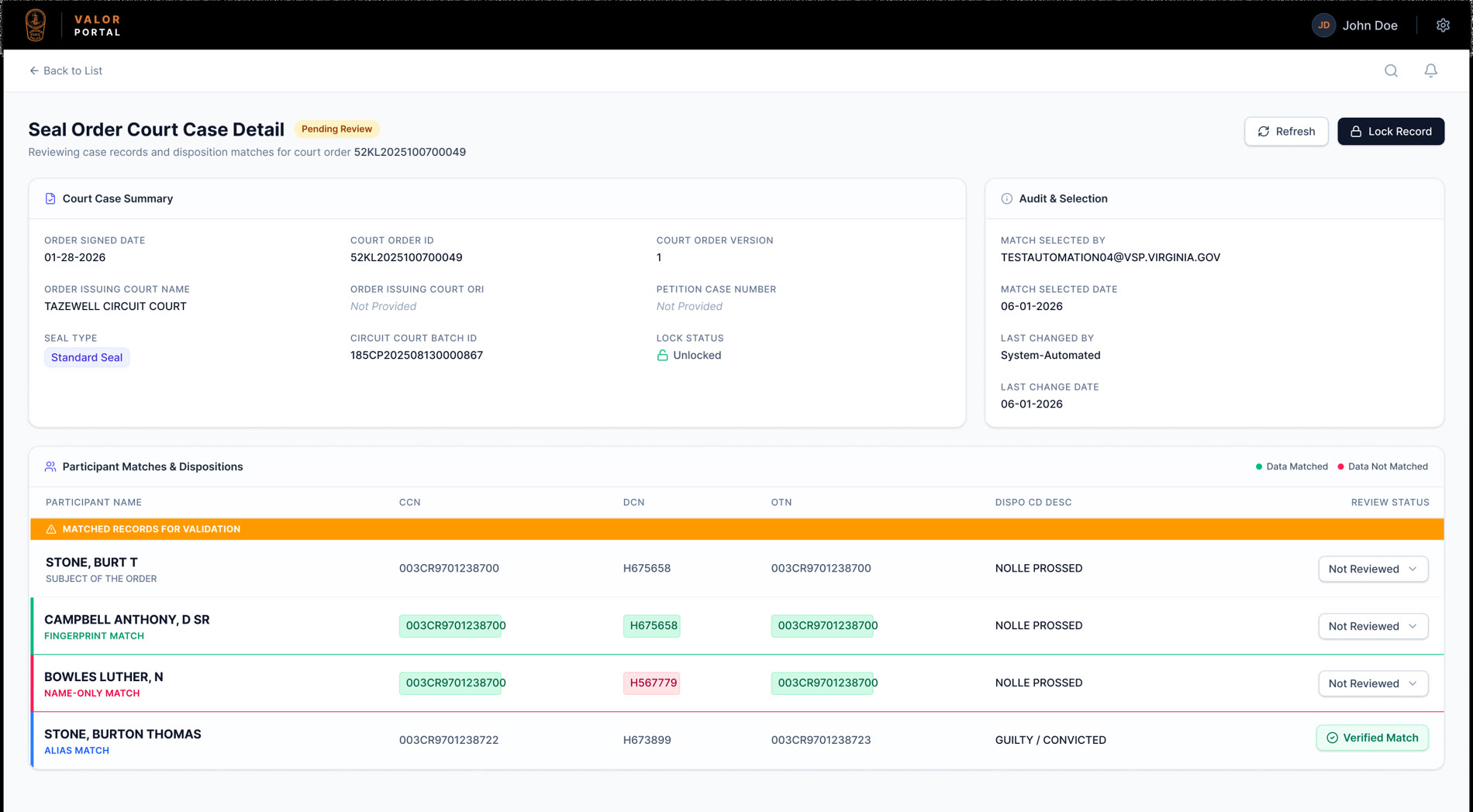
Direction 1 — the Valor Portal
A light, document-style layout with semantic match labels — Fingerprint Match, Name-Only Match, Alias Match — so an analyst reads the strength of each candidate instantly, plus per-field green/red highlighting so a single mismatched DCN can't hide in a row of numbers.
Direction 2 — the VSP Judicial system
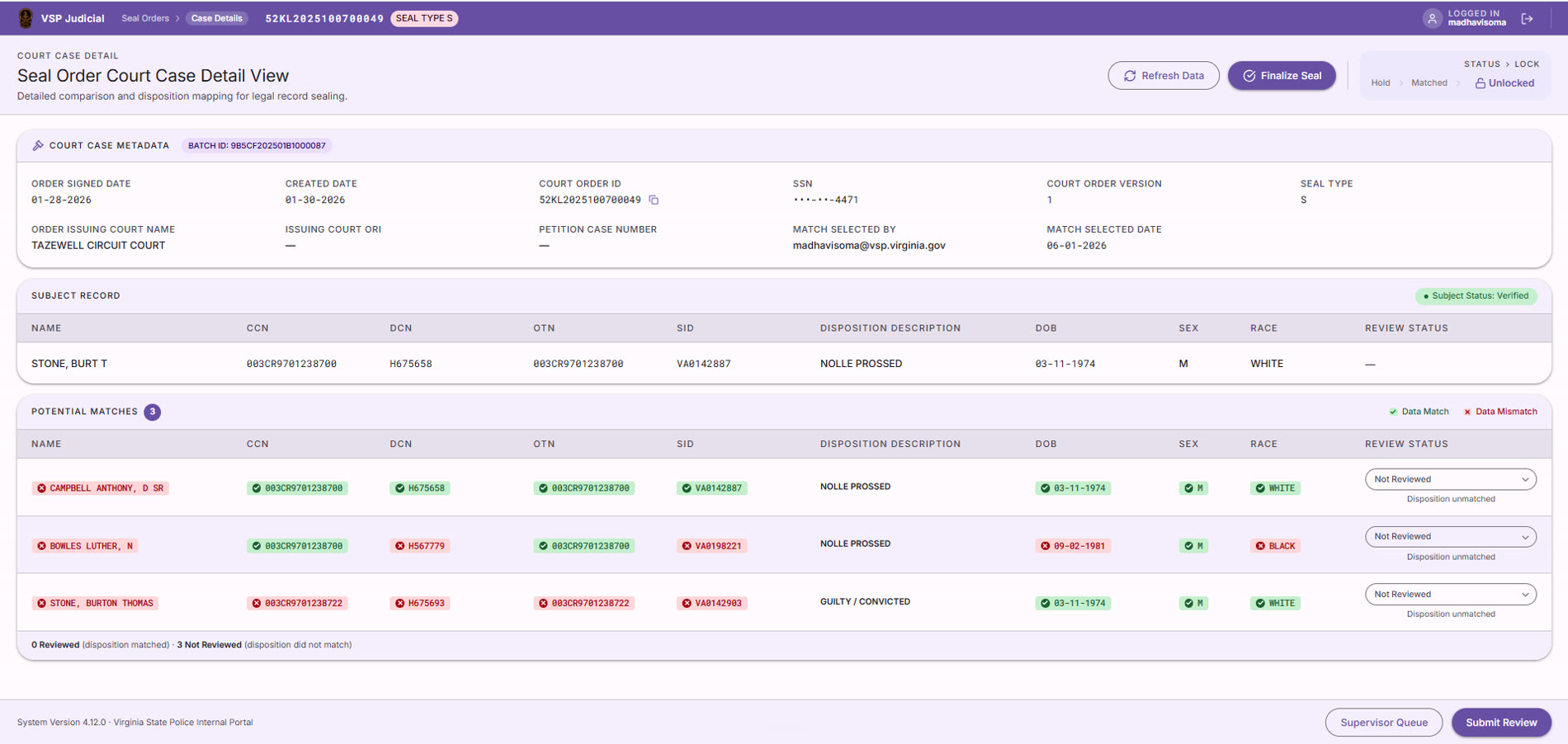
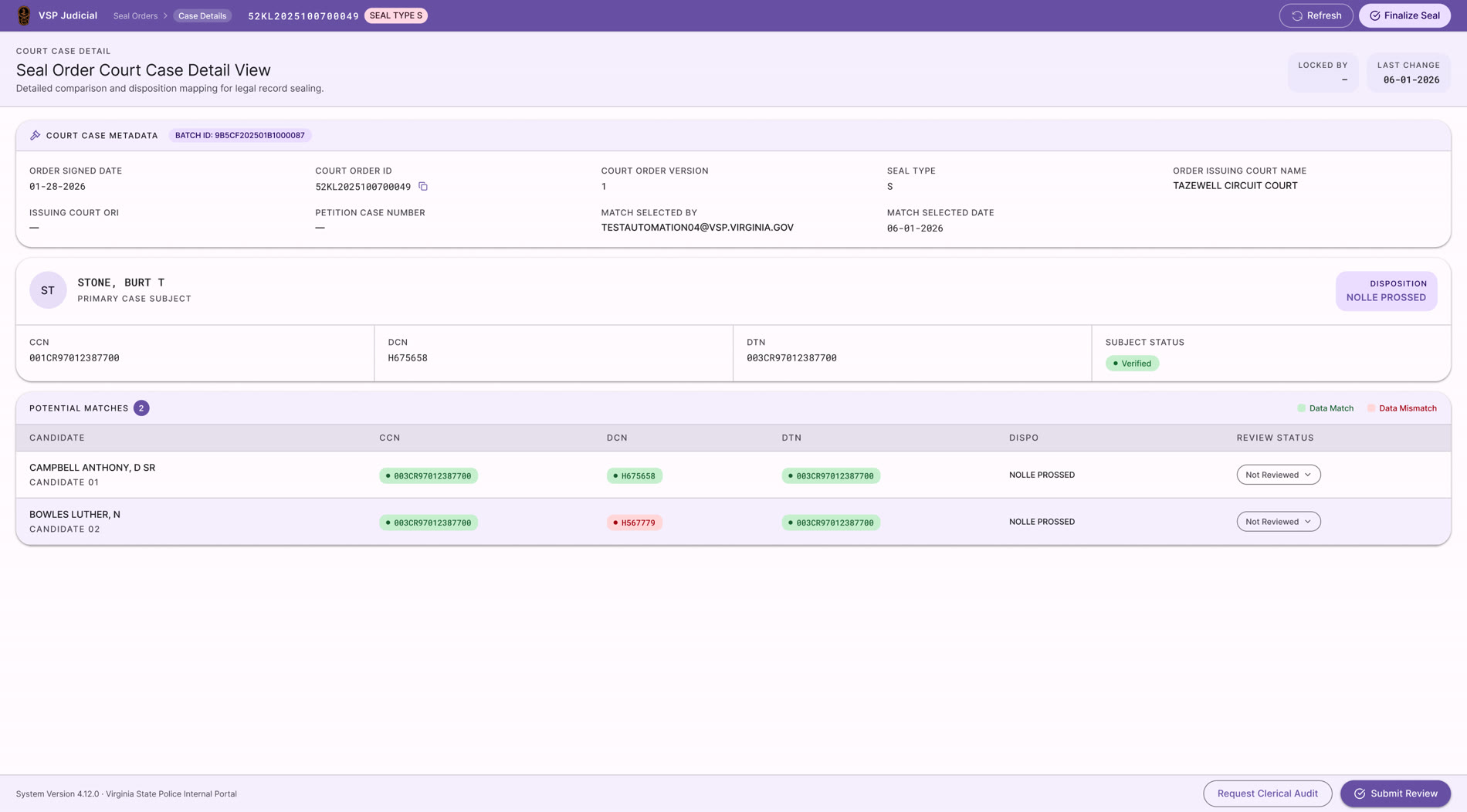
I re-grounded the interface in VSP's own judicial identity: a calmer purple system, the court order set clearly against each potential match, and the disposition mapping made explicit. Less database, more considered judicial decision. This is the direction the client responded to.
Direction 3 — the Match Console
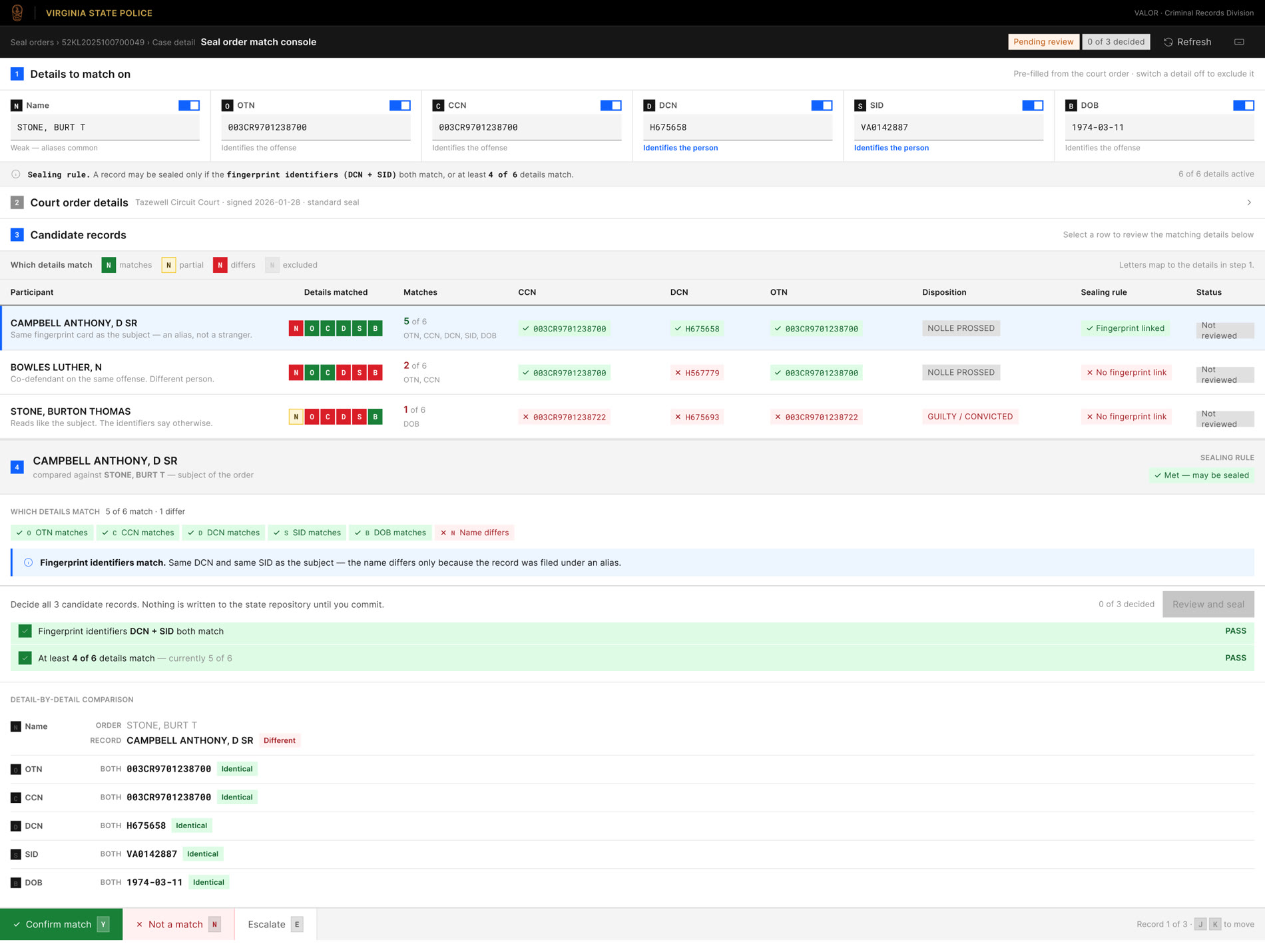
I pushed a power-user direction to find the ceiling: a dense console with toggles, an explicit sealing rule spelled out, and keyboard-first review for analysts working through volume. It defined the upper bound — and confirmed the middle direction was the right call.
The chosen direction, refined with feedback
The client picked the Judicial direction and I folded in every note: Created Date and SSN added, DOB / Sex / Race / SID columns, a plain-English Disposition Description, per-field ✓ / ✗ match pills, a Hold → Matched → Unlocked status flow, and a Supervisor Queue with Submit Review and Finalize Seal actions.
The colour logic
Colour is the verification, done for you
The whole interface exists so an analyst never compares two identifier strings by eye. The system compares and colours the result, against VSP's judicial purple.
Key decisions
The calls that made sealing safe
Semantic match labels, not a match score
Why“Fingerprint Match” tells an analyst why to trust a candidate and what evidence backs it; a raw percentage makes them guess. The label carries the reasoning, not just the confidence.
Per-field ✓ / ✗ pills instead of one row-level status
WhyThe sealing decision is made field by field, so verification has to be field by field. A single “matched” row hides the one red DCN that should stop everything.
Disposition description, not just the code
WhyShowing “Nolle Prossed” instead of a raw code removes a lookup and a chance to misread — recognition over recall, on a field with legal consequences.
A staged sealing action — Hold → Matched → Finalize
WhyAn irreversible legal action should never be one click. The status flow forces explicit confirmation, and a supervisor queue puts a second set of eyes on it before any record is sealed.
Masked SSNs and synthetic data throughout
WhyThe interface handles some of the most sensitive data a state holds. Masking identifiers by default and designing only against test records keeps that sensitivity respected from the first pixel.
Where it stands
More case studies