A government lab dashboard that read like a database dump
Redesigned the Kerala state government's tissue-culture traceability dashboard — from a generic admin-panel template dumping raw sensor tables into a system built around six production stages and the people running them.
- Role
- Product designer — redesign of the production dashboard
- Timeline
- 2026
- Team
- With PIPRA's team, for K-DISC / Biotechnology & Model Floriculture Center
- Platform
- Web — internal government dashboard
- Status
- Redesign delivered
The problem
The live dashboard at tissueculture.kdisc.kerala.gov.in was a generic admin-panel template — plain pie charts, dense raw sensor tables, and orange accent bars with no meaning behind them.
The outcome
A dashboard organised around the six real production stages and the people running them, with sensor data shown as scannable status cards instead of raw tables.
If you read nothing else
This is real, live government infrastructure — a state programme tracking plant tissue-culture production from lab to field, not a concept exercise.
The old dashboard was a template with data poured into it; the redesign is organised around six real production stages — Initiation, Callusing, Multiplication, Elongation, Rooting, Hardening.
The clearest single win: rows of raw IoT temperature and humidity readings became compact status cards you can read in one pass down a shift.
K-DISC runs a real state programme: tracking plant tissue cultures through a lab pipeline, in growth rooms wired with temperature and humidity sensors, all the way to field collection. The dashboard that ran it looked like an admin template nobody had customised.
What was actually wrong
A template with data poured into it
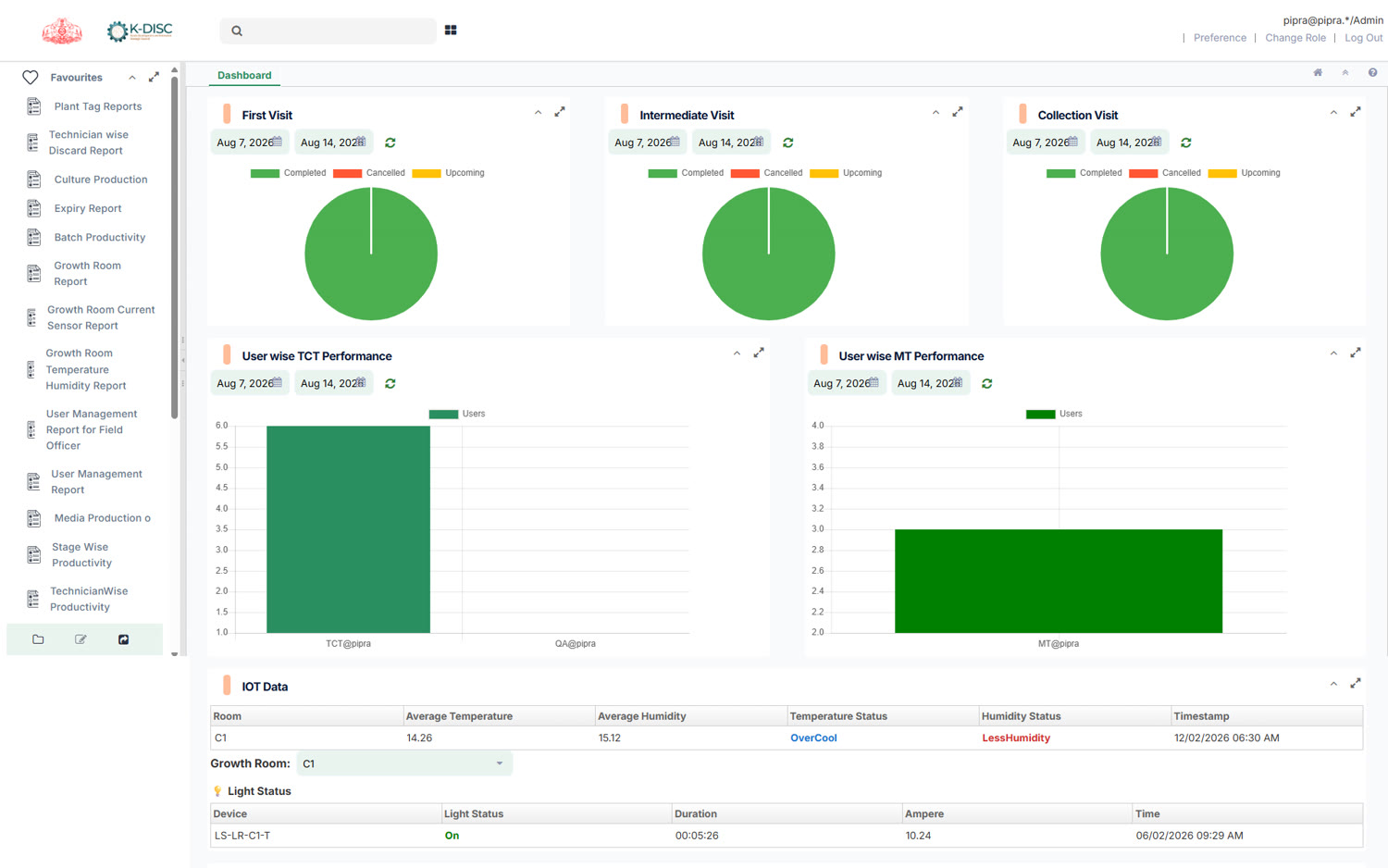
Nothing on the old dashboard was broken — every number was real and current. The problem was that it read like the default screen of whatever admin-panel framework it was built on: a collapsible “Favourites” sidebar, orange accent bars on every card regardless of what the card meant, and plain filled pie charts with no centre total to anchor the eye.
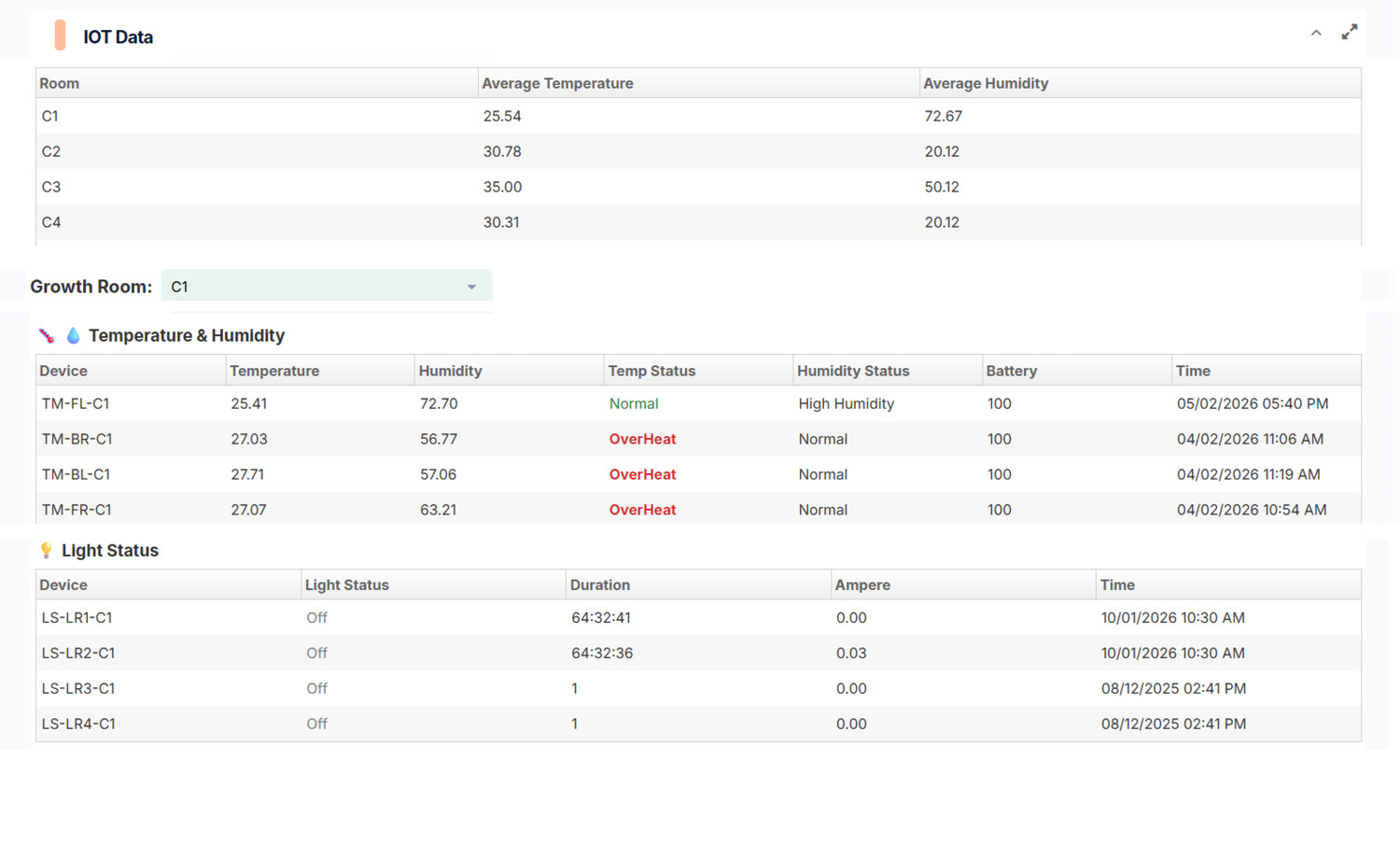
The worst offender was the IoT section. Average temperature, humidity, per-device readings, light status, battery — all of it as raw table rows. “OverHeat” and “LessHumidity” sat in the same red as an error message, with no way to tell at a glance which growth room actually needed attention right now.
The reframe
Organise around the six stages, not around the sensors
A tissue culture moves through six defined stages on its way from a lab sample to a plantable sucker: Initiation, Callusing, Multiplication, Elongation, Rooting, Hardening. That's the actual mental model of everyone using this system — a technician, a field officer, a programme manager all think in stages, not in database tables. So the redesign puts stage-wise distribution and rejection history front and centre, with the sensor data demoted to supporting status, not the headline.
Design principles
Three rules for a civic data dashboard
Summarise before you tabulate
Every data section leads with a scannable summary — a status card, a stage count — before any raw table. A table is for someone who already knows what they're looking for; a summary is for everyone else.
Colour only where it means something
The old dashboard used the same orange bar on every card type. The redesign spends colour deliberately — green for on-track, amber and red reserved for what actually needs a person's attention.
Match the navigation to the job, not the database
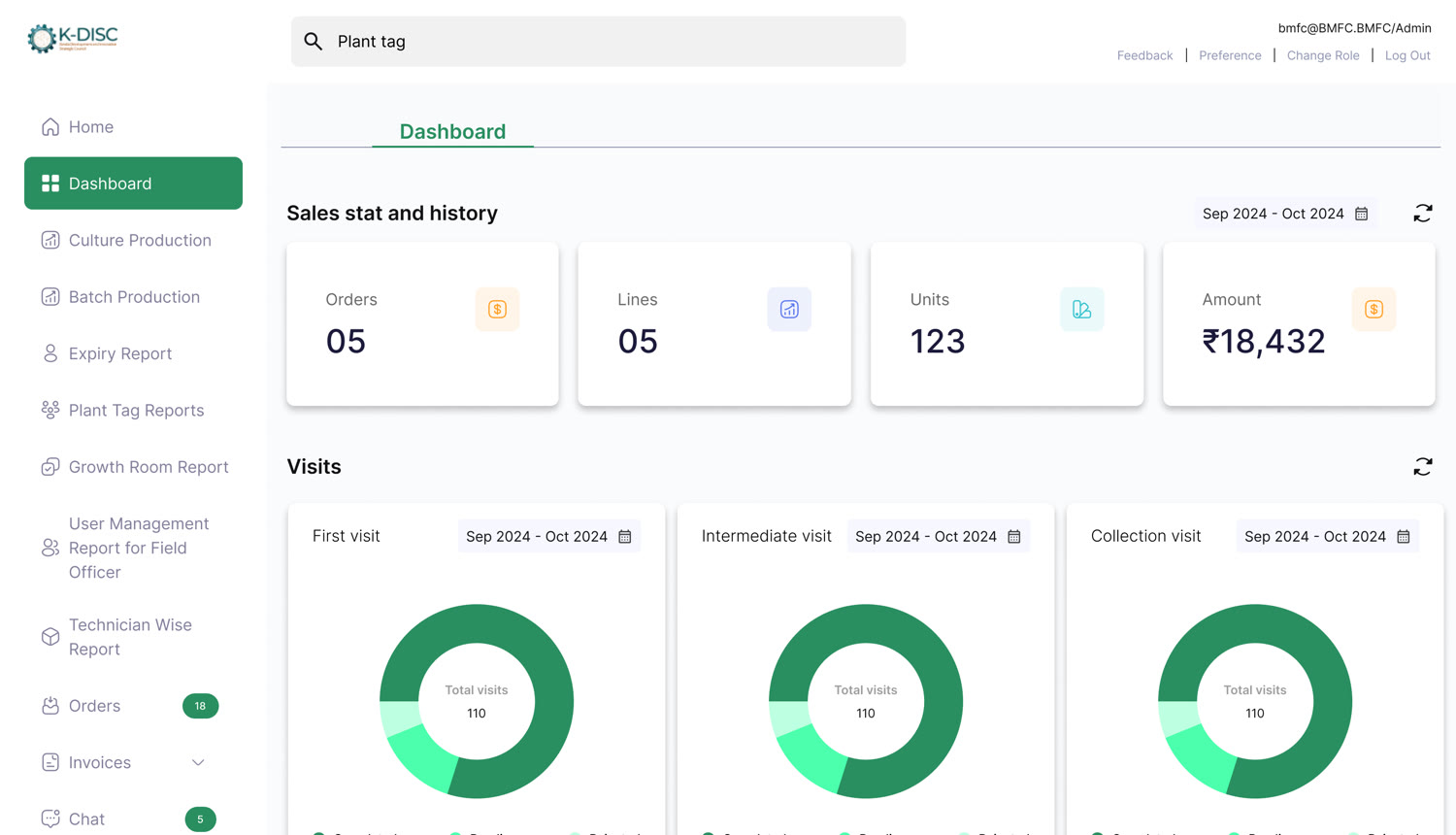
The sidebar is organised by task — Culture Production, Batch Production, Growth Room Report, Plant Tag Reports — mirroring how a technician or field officer actually describes their day, not the underlying table names.

Key decisions
Widget by widget, against the old style
A donut with a centre total and a percentage legend, not a plain filled pie
WhyThe old “First visit” chart was a solid pie with a colour key underneath — you had to match colours to a legend and estimate proportions yourself. The redesign prints the total (“110”) in the donut's centre and states each share as a percentage (Completed 60%, Pending 10%, Rejected 20%) directly under its own dot. The headline number and the breakdown are both handed to you, not inferred.
One IoT reading per IoT card, not one row in a six-column table
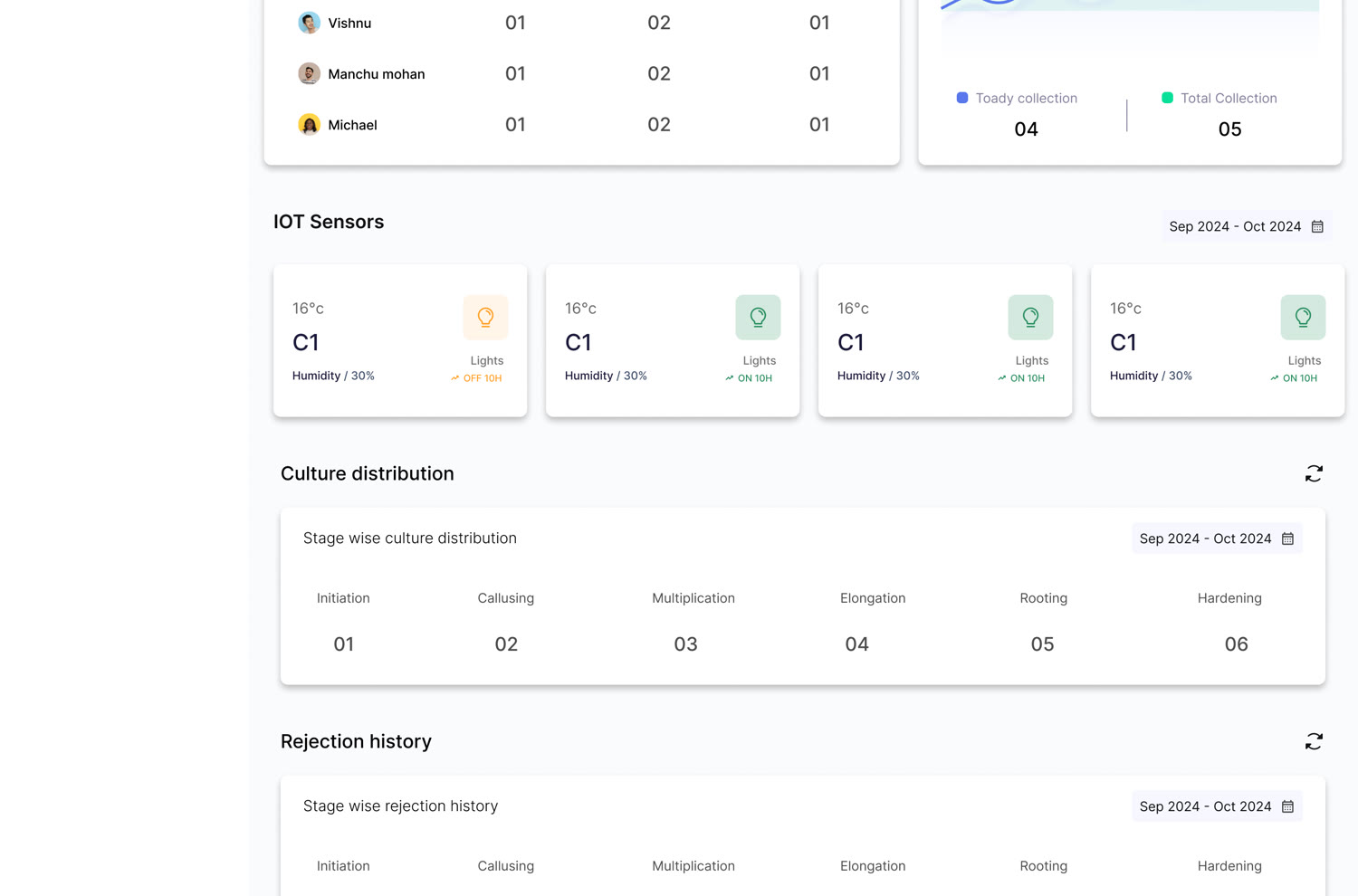
WhyThe old IoT table forced a left-to-right scan across Room, Temperature, Humidity, Temp Status, Humidity Status, Battery and Time just to answer “is C1 fine?” The redesigned card puts the room, the live temperature, humidity and light state on one face — “16°C · C1 · Humidity/30% · Lights OFF 10H” — so that single question is answered without scanning a row.
Stage names as column headers over big numbers, not a dense data table
WhyStage-wise culture distribution reads as six wide columns — Initiation, Callusing, Multiplication, Elongation, Rooting, Hardening — each with one large number underneath. No table borders, no repeated row chrome. It reads like a row of KPIs, because that's what it actually is to the person checking it.
Keep room-by-stage detail in a real table, but make it a table again
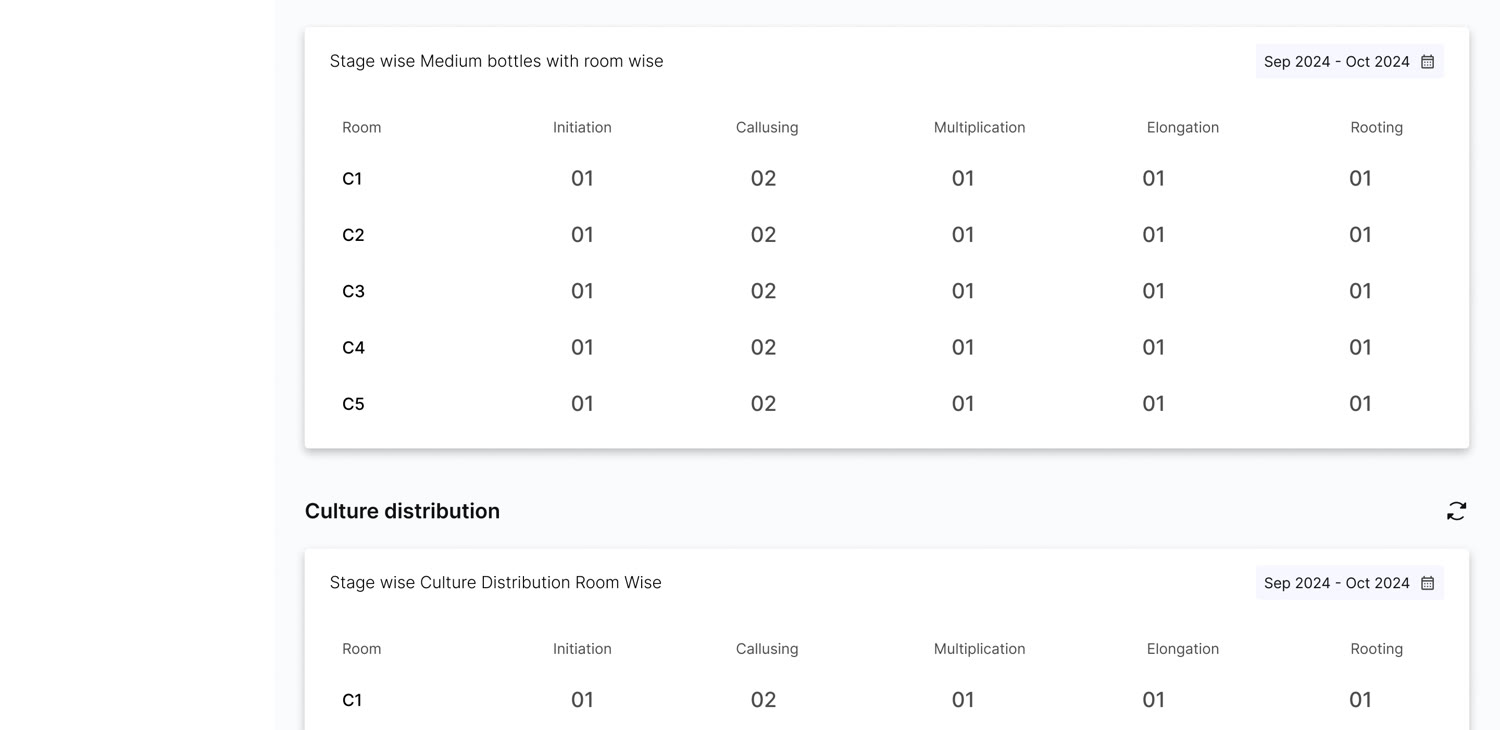
WhyNot every view should be de-tabled — “Medium bottles by room” genuinely is a matrix (5 rooms × 5 stages), so it stays a table. The decision was giving it clean row separation, aligned numerals, and a bold room label per row, instead of the cramped, low-contrast grid the old dashboard used for the same kind of data.
Bar charts get gridlines, readable labels and a hover tooltip with the exact figure
WhyThe old “User wise TCT Performance” chart had unlabeled axes and username labels like “TCT@pipra” that didn't read as a person. The redesign gives every user a real name (Muthu, Srikanth, Mahindra), adds horizontal gridlines so bar heights are comparable at a glance, and puts the exact number behind a hover — “Muthu · 44,058 · Total” — so the chart works both as an at-a-glance comparison and as a precise lookup.
Keep the government identity, not a generic template skin
WhyThe Kerala state emblem and the K-DISC mark carry real institutional trust. Rather than replace the branding with a generic dashboard look, the redesign kept it visible — including on the app's own entry screen — so the system still reads as official.
Task-based navigation instead of table-based navigation
WhyRenaming and regrouping the sidebar around what a user is trying to do — production, reports, users — instead of what table the data happens to live in removes a translation step between the job and the interface.
Where it stands
What I took from it
Civic dashboards fail quietly
Nobody complains loudly about a confusing government dashboard the way they would about a broken consumer app — they just work around it, or stop trusting the numbers. The old dashboard wasn't wrong, it was just unreadable at the speed the job actually moves at. Redesigning around the six real stages instead of the underlying tables is the same lesson as everywhere else in this portfolio: design the task, not the data model.
More case studies